Legal OCR that lives on your Mac.
Drop a folder of scans, photos, or PDFs. Get back a clean Relativity-ready loadfile in minutes, without a single page leaving your machine.
Outputs load cleanly into
You're uploading privileged documents to someone else's server to get searchable text.
Cloud OCR means your documents sit on a third party's hardware, subject to their retention policies, their breach surface, and their bill. For litigation work, that's the worst place to put them.
-
Confidentiality exposure.Client documents move through a vendor's pipeline. Even with NDAs, that's a chain-of-custody hole you can't close.
-
Per-page pricing that never ends.Every production cycle gets metered. A single depo binder can quietly burn hundreds of dollars in OCR fees.
-
Upload queues on deadline.A 20 GB batch takes the evening to upload before recognition even starts. Tomorrow's filing doesn't care.
-
Loadfiles you still have to fix.Most cloud OCR outputs need re-keying before Relativity will ingest them. The "done" file isn't actually done.
Same result. Fundamentally different posture.
Every row is a decision a partner or GC will ask about. Here's how the two approaches actually compare.
Built around the shape of a litigation deadline.
Three things, executed well. No account, no dashboard, no plugin ecosystem. Just the OCR-to-loadfile pipeline a review team actually runs.
Drop a folder. Every file and every PDF page runs in parallel.
VisionBlitz schedules work across every CPU core on your machine. Multi-page PDFs get split into per-page tasks, so a 200-page deposition finishes in the time a single page would take on one thread. No queueing. No uploading. Processing starts the moment you drop.
Exports the exact loadfile your review platform expects.
Concordance DAT, CSV, and Opticon OPT with standard field names: DOCID, FILEPATH, TEXTPATH, PAGECOUNT. Windows line endings, sequential DOCIDs, TEXT and NATIVES directories alongside. Ingests cleanly into Relativity or any platform that reads Concordance.
Runs entirely on-device, on Apple Silicon or Intel.
Recognition is Apple's own Vision framework, the same engine that reads text in Photos. Sandboxed by macOS, zero network calls, zero telemetry, no account. The only thing it asks for is permission to read the folder you drop on it.
One window. Everything you need.
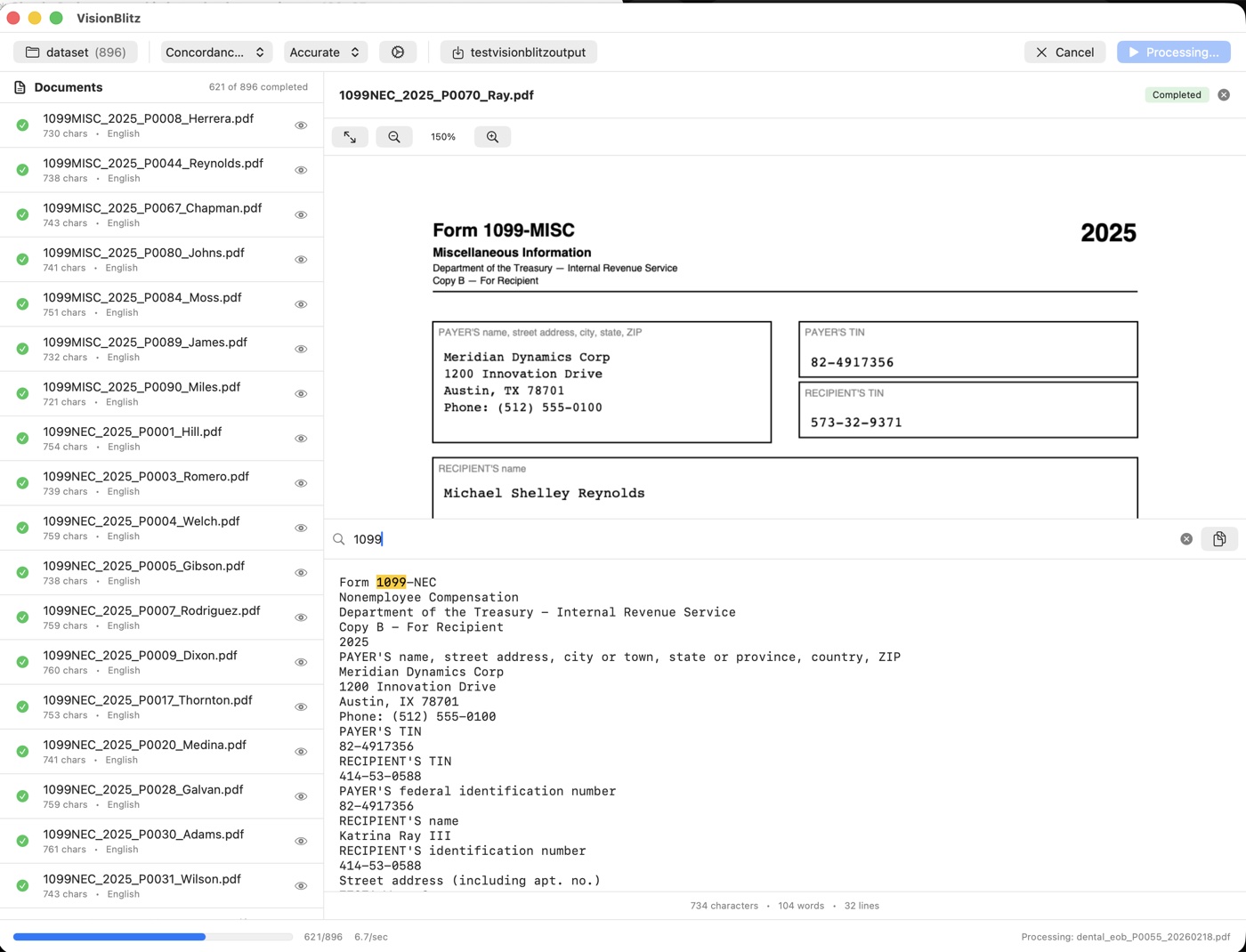
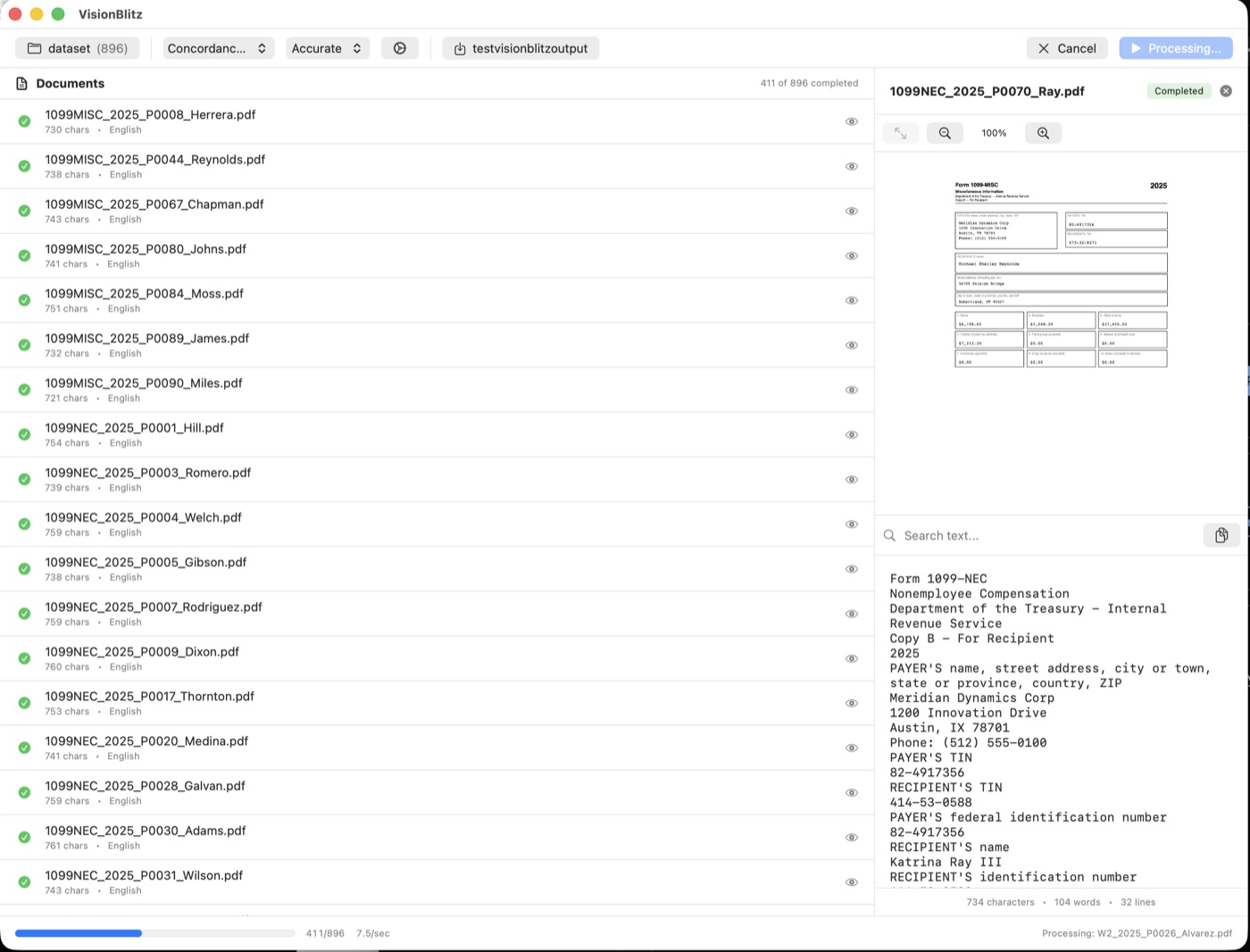
Document list on the left, full preview with zoom and search on the right, live progress at the bottom. That's the whole app.
A clean folder you can hand off unchanged.
Every run creates a timestamped export folder with sequential DOCIDs, a TEXT/ directory, a NATIVES/ directory, and the loadfile itself. Drop the folder into Relativity, Everlaw, DISCO, Nuix, or any platform that reads Concordance. Nothing else to configure.
export-2026-04-16_14-32-08_fast/
├── TEXT/           # one .txt per document
│   ├── DOC000001.txt
│   ├── DOC000002.txt
│   └── …
├── NATIVES/        # originals, DOCID-prefixed
│   ├── DOC000001_scan.pdf
│   └── …
├── loadfile.dat    # Concordance DAT
└── loadfile.opt    # Opticon overlay
One price. On the Mac App Store. Forever.
One-time purchase · Family Sharing supported · Refund via Apple within 90 days
- Unlimited documents, unlimited batches
- All three loadfile formats (DAT, CSV, OPT)
- Runs offline. No account. No telemetry.
- Free updates for v1.x
What partners, paralegals, and IT want to know.
If something here isn't clear, email support. A human replies.
Does any document or text leave my Mac?
How does the Relativity loadfile work?
loadfile.dat (or CSV) with standard fields: DOCID, FILEPATH, TEXTPATH, CUSTODIAN, PAGECOUNT. Alongside it you get a TEXT/ directory and a NATIVES/ directory. An Opticon-format .opt file can be generated at the same time. The folder can be dropped straight into Relativity's ingestion flow; paths are relative so the whole package is portable.What file formats can it read?
How accurate is Apple Vision for legal documents?
Does it work on Intel Macs?
What about larger firms? Is there a team or volume license?
What if OCR misreads something?
Who makes VisionBlitz?
Stop emailing evidence to OCR vendors.
VisionBlitz lives on your Mac. One price, no account, no page ever leaves the machine.